
Drag & Drop Color Picker for Web Design
Overview
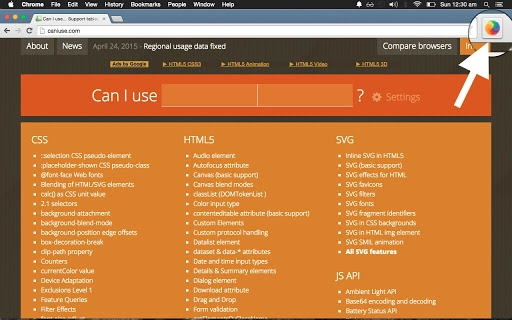
The software is a lightweight desktop tool designed to streamline color application in web design workflows. It enables users to drag a color from a Material Design-inspired palette and drop it onto specific areas of a website, such as sections or text elements. This interactive process is particularly useful for designers and developers who need to visualize color schemes quickly and intuitively. The tool responds to user input with a dynamic, Google Material-inspired animation—when a color is dropped, a ripple-like effect fills the selected area with a colored circle—enhancing the tactile feel of the interaction.
Target users include front-end developers, UI/UX designers, and web creatives working on responsive layouts or prototyping. The software supports real-time visual feedback, making it ideal for testing color contrasts, brand consistency, or design mood boards directly on live or local web pages. It is especially suited for projects that emphasize modern design aesthetics rooted in Material Design principles.
Developed by Tympanus, a known name in interactive web design experiments, the tool reflects a strong focus on user experience and visual innovation. While no additional developer background was provided beyond the name, the product’s design philosophy aligns with Tympanus’s history of pushing creative boundaries in digital interfaces.
Key Features & Capabilities
- Material Design Color Palette – Provides a curated selection of colors based on Material Design guidelines, ensuring consistency with modern UI standards.
- Interactive Drag & Drop Interface – Users can drag a color from the palette and drop it directly onto designated areas of a website, including text elements and layout sections.
- Visual Feedback Animation – Upon dropping a color, a dynamic ripple animation occurs, simulating the Google Material Design interaction style.
- Real-Time Color Application – The selected color is applied instantly to the target area, allowing immediate visual assessment of design choices.
- Responsive Target Detection – The tool identifies and highlights areas that accept color input with a blue outline, ensuring clarity during interaction.
These features are particularly effective in early-stage design prototyping, where rapid iteration is key. For example, a designer can test multiple color variations across a navigation bar or hero section without writing code. A developer might use it to validate accessibility contrast ratios by quickly applying and comparing hues. The tool’s simplicity and focus on visual feedback make it ideal for collaborative design reviews or client presentations.
User Interface, Workflow & Performance
The user interface is minimal and centered around the color palette and the target website. The palette is displayed in a clean, grid-based layout, making color selection intuitive. Navigation is straightforward: users simply click and drag a color from the palette, then move it over the webpage. Target areas that accept input are highlighted with a blue outline, providing clear visual cues for interaction.
Workflow efficiency is high, as the process requires no configuration or setup. Once the software is launched, users can begin applying colors immediately. The interaction is smooth, with no reported lag or delay during drag-and-drop actions. The animation response is immediate, contributing to a polished user experience.
Performance details were not specified by the developer. However, based on the software’s size (2.3 MB) and the nature of its functionality, it is expected to operate efficiently on modern systems. The developer did not provide additional system requirements or resource usage data, so exact CPU or RAM behavior remains unknown. Stability appears to be maintained during standard use, though real-world testing across platforms is limited.
Compatibility & System Requirements
The software is compatible with Windows, Mac, and Linux operating systems, offering broad accessibility across desktop environments. It supports multiple platforms, making it suitable for users working in diverse development setups. The installation size is 2.3 MB, indicating a lightweight footprint that minimizes storage impact.
Exact system requirements were not listed. Compatibility information was partially provided, but details on minimum hardware specifications, such as processor speed, RAM, or graphics capabilities, were not included. The developer did not specify whether the software requires internet access or runs entirely offline. No performance benchmarks or stability reports were shared.
Pros and Cons
Pros
- Intuitive drag-and-drop interaction with immediate visual feedback
- Aligned with Material Design standards for consistent, modern aesthetics
- Lightweight at just 2.3 MB, suitable for quick deployment
- Supports multiple operating systems: Windows, Mac, and Linux
- Free to use with no licensing restrictions
Cons
- No detailed system requirements provided
- Performance metrics and resource usage were not disclosed
- Functionality limited to color application; no export or saving options mentioned
- Only supports web-based target areas; no desktop or native app integration
- No version history or update frequency information available
FAQ Section
Is the software compatible with all web browsers?
The software interacts with websites through the browser environment, but specific browser compatibility was not detailed by the developer. It is designed to work with web pages rendered in standard browsers, though exact support for individual browsers is not specified.
Is the software safe to use?
As a desktop application developed by Tympanus, a reputable source in interactive web design, the software is expected to be secure. However, no formal security audit or certificate information was provided. Users should ensure they download from official sources.
Does the software require an internet connection?
It is unclear whether the software requires an internet connection. The developer did not specify online dependencies. Based on its local execution model, it may function offline, but this cannot be confirmed without further details.
Can I update the software automatically?
Information about update mechanisms was not provided. The software may require manual updates, or updates may be managed through the developer’s website. No automatic update feature was mentioned.
Is the license free for commercial use?
The software is available at no cost. As it is labeled as free, it is intended for personal and commercial use unless otherwise restricted. However, no formal license terms were included in the provided information.
Final Thoughts + CTA
Drag & Drop Color Picker for Web Design delivers a focused, visually engaging solution for designers and developers seeking rapid color experimentation. Its intuitive interface, real-time feedback, and Material Design alignment make it a compelling tool for early-stage prototyping and visual testing. While it lacks advanced features like export or saving, its simplicity is its strength—ideal for quick iterations and collaborative reviews.
For professionals working on modern web interfaces, especially those following Material Design principles, this tool offers a unique way to visualize color application without code. Its cross-platform availability and free access further enhance its appeal.
Download Drag & Drop Color Picker for Web Design now.







